

Bre comes from a world of technical support and customer education that's led her to technical writing, customer marketing, and product marketing. When she's AFK, you can find Bre backpacking in the Rockies or throwing her club and kicking the ball off the tee in a friendly game of golf.
August Product Updates: Shopper Automations Spotlight
Most marketing teams hit the same optimization ceiling eventually: 20+ automation flows to keep updated, more and more segments that still aren't truly 1:1, and no bandwidth to handle responses at scale. Doing more of this doesn't actually get you much further and hits diminishing returns fast. Shopper Automations exists to break past that ceiling by letting Shopper decide the next message for each subscriber individually.
This month, we're spotlighting the results brands are driving with it, plus a quick recap of two more releases from July that plug directly into Shopper: Offer Management, which feeds Shopper the offer data it uses to personalize messages, and Ask Shopper, which lets you query the conversations Shopper is having with your subscribers.
Shopper Automations: Treat every subscriber like their own segment
Shopper Automations takes your core automation triggers like cart abandonment, checkout abandonment, link clicked, and browse abandonment and makes them 1:1. Instead of a 1:many flow, each subscriber gets a message written specifically for them. Shopper decides what to say, when to send it, and which offer to include (more on Offer Management later), based on that subscriber's funnel stage, onsite behavior, and past conversations.
It starts with Brand Center, which trains Shopper on your brand voice, offers, and product knowledge, the context every message is built from. From there, Shopper Automations and Shopper Responses work together to carry the conversation forward: when Shopper needs more context from a subscriber, Responses picks up the conversation, and Automations follows up with a message based on what it learned.
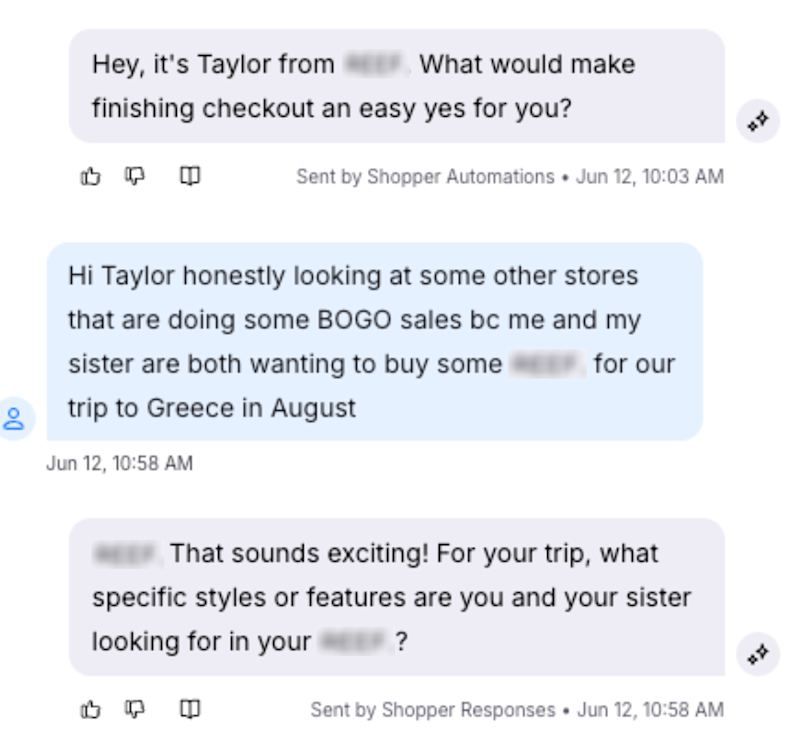
Shopper automations in action
Launch with confidence
When you get started with Shopper Automations, you’ll set up a test vs control split to measure against your existing automation flows and build confidence in the results. The control group keeps running through your existing flows the whole time, so nothing changes for them while you test. Built-in guardrails also keep sending volume in line with what you're already used to, so Shopper Automations targets similar volume to your existing program from day one.
You also get full visibility into message quality. Shopper Playground lets you test message quality and use cases in a demo environment before anything goes live. The message feedback loop lets you flag issues at the individual message level, with guidance on what to adjust in Brand Center to improve future messages. And Message Details, new for Shopper Automations, lets you click into any AI-generated message and see exactly what went into that decision: the tactic used, the offer attached, the content pulled in, and which subscriber details were relevant.
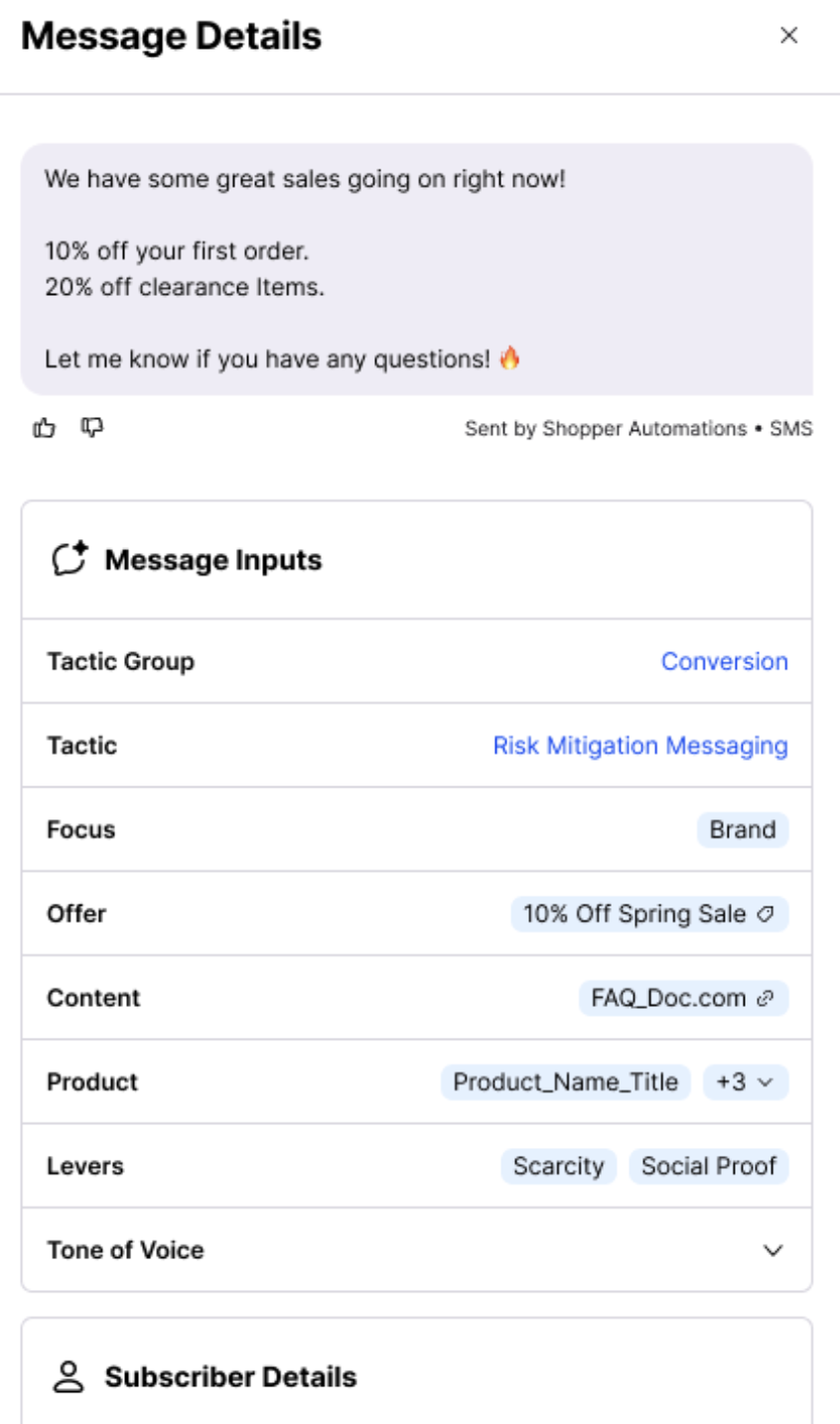
Test results
Shopper Automations measures against your own automations with built-in reporting on revenue per subscriber, ROI, CTR, and unsubscribe rate. Across brands running Shopper Automations and Responses together:
Revenue per subscriber is up 5 to 10% on average
Median incremental ROAS of 15x
Unsubscribe rates are running 25% lower than the control group
Here's what results have looked like for three brands running Shopper Automations and Responses together today.
Mack Weldon: 40x Incremental Return
"We've been very happy with the results, the lift has been really strong," said Emily Schlackman, Director of Retention Marketing at Mack Weldon. "Shopper Automations has especially improved our orders and revenue from our welcome flow, an area we've always struggled with."
Mack Weldon has seen a 40x incremental return, a 15.2% lift in revenue per subscriber, and a 35% lower unsubscribe rate since launching Shopper Automations.
Beekman 1802: 32% Revenue Per Subscriber Lift
"We are thrilled with the lift that we've seen since launching our Shopper Automations test and excited to keep expanding and see what's next," said Gabrielle S., Sr. Manager of Ecommerce & CRM at Beekman 1802.
Beekman 1802 has driven an 18x incremental return, a 32% lift in revenue per subscriber, and a 29% lower unsubscribe rate with Shopper Automations.
Portland Leather: Scaling to an 80% Test Group
"At 50/50 split, we were seeing great results with a 17x incremental return," said Matt Fey, Director of Marketing at Portland Leather. "All of the testing data is very clearly presented, which made it a no-brainer decision for us to increase our Shopper Automations group to 80%."
Along with that 17x incremental return, Portland Leather has seen an 11.6% lift in revenue per subscriber and now drives 6,200 monthly conversations with subscribers through Shopper.
Shopper Automations is available to brands on the Postscript AI plan. Learn more or get started here.
Offer Management: One place to view and manage your offers
Running promotions across flows, popups, landing pages, and Shopper shouldn't lead to manually rebuilding the same offer in four different places and hoping you didn't miss one. Offer Management gives you a centralized view of your offers across Postscript, so you build a promotion once and launch it everywhere it needs to run.

Advanced Discounting lets you build stacking, BOGO, gift-with-purchase, subscription offers, and free shipping natively inside Postscript. And now, Postscript offers Subscriber Mapping so that when a subscriber triggers an offer across more than one touchpoint, they get the same code every time, which protects your margins from code stacking.
Looping back to Shopper, Offer Management gives Shopper a complete, real-time view of each subscriber's offer history, so when Shopper Automations decides which offer to include in a message, it's pulling from the same live offer record.
If you already manage discounts in Shopify, you can import your existing Shopify offers directly into Postscript.
Offer Management is available now in Brand Center. Go to Offers in Brand Center or learn more.
Ask Shopper: Query thousands of Shopper conversations to learn more about your customers
Shopper is talking with your customers all day, every day. Ask Shopper lets you dig into those conversations by asking a question, and getting back a structured breakdown of themes, patterns, and the specific conversations behind every insight, no manual digging through individual threads required.
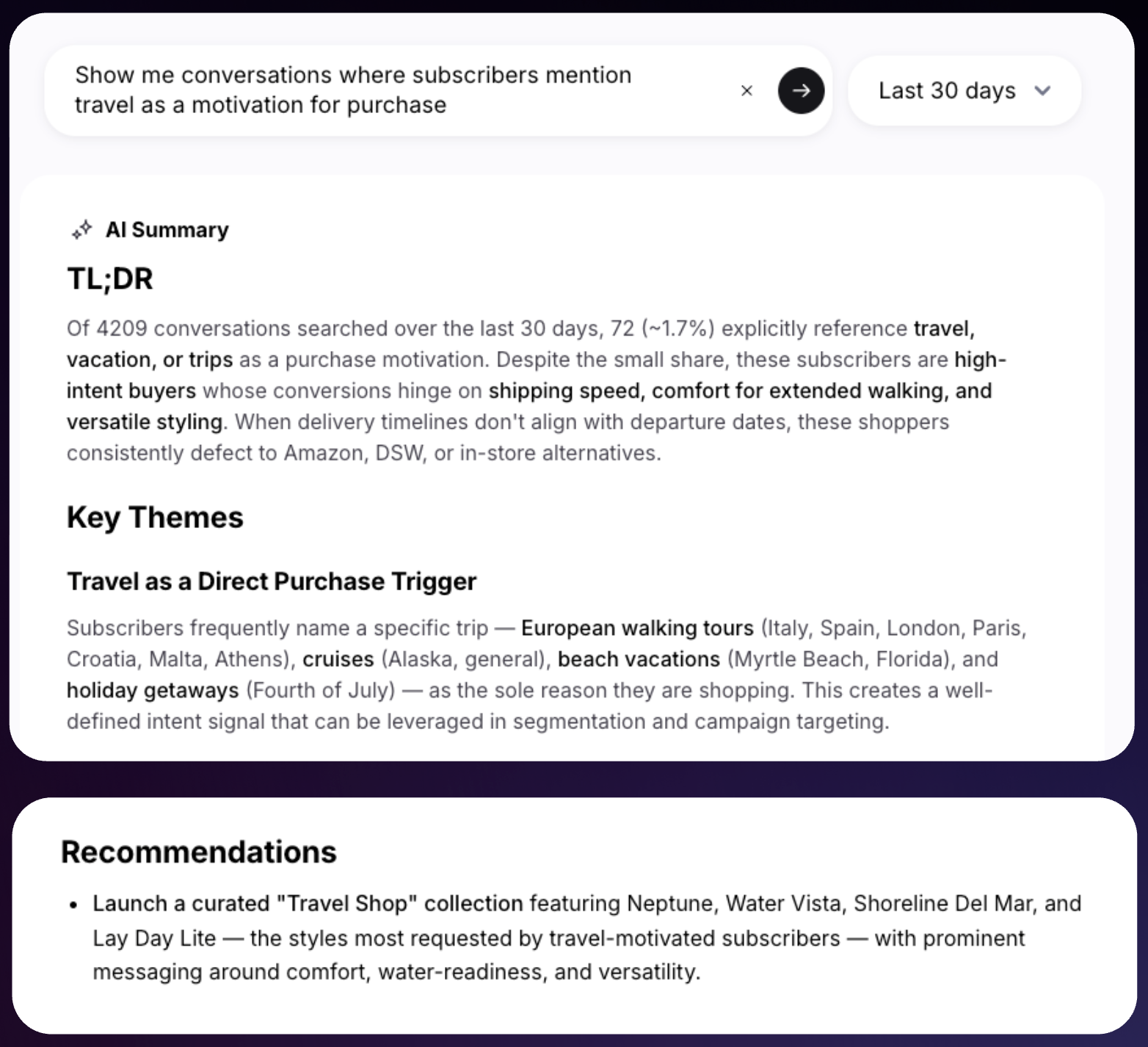
From your Shopper Analytics page, you can scope any question to a specific time period to see what's changing, track the impact of a campaign, or zero in on a moment in your customer base. Every result links back to the real conversations behind it, and it's shareable by link so your whole team can see the exact query and breakdown.
A few things brands are asking Shopper:
What objections might we address on our product pages to help customers convert?
Are customers running into promo codes that aren't working? Which ones?
Which campaigns, flows, and automations drive the most Shopper conversations?
Tell me about the conversations from our {Campaign Name} campaign.
What's our conversion rate from Shopper conversations?
What are the most common themes over this time period?
What are the most common reasons customers escalate to support?
Do people ask about restocks for out-of-stock items? If so, which ones?
What products are customers asking about most?
Answers to some of these questions are likely not just marketing insights. For example, the answer to the last two questions could be something you can hand to your buyers and operations team as you plan next year's merchandising and marketing.
Ask Shopper is available now for brands using Shopper. Go to Ask Shopper or learn more.
With 1:1 agentic marketing, every subscriber gets treated as their own segment, receiving a personalized experience with your brand that's informed by real-time offer data and a growing picture of who your customers are, what they want, and what's stopping them from buying.
In case you missed it, we've got some exciting news to share: we're launching email! Join us live on September 23 to see it first. Register here.
